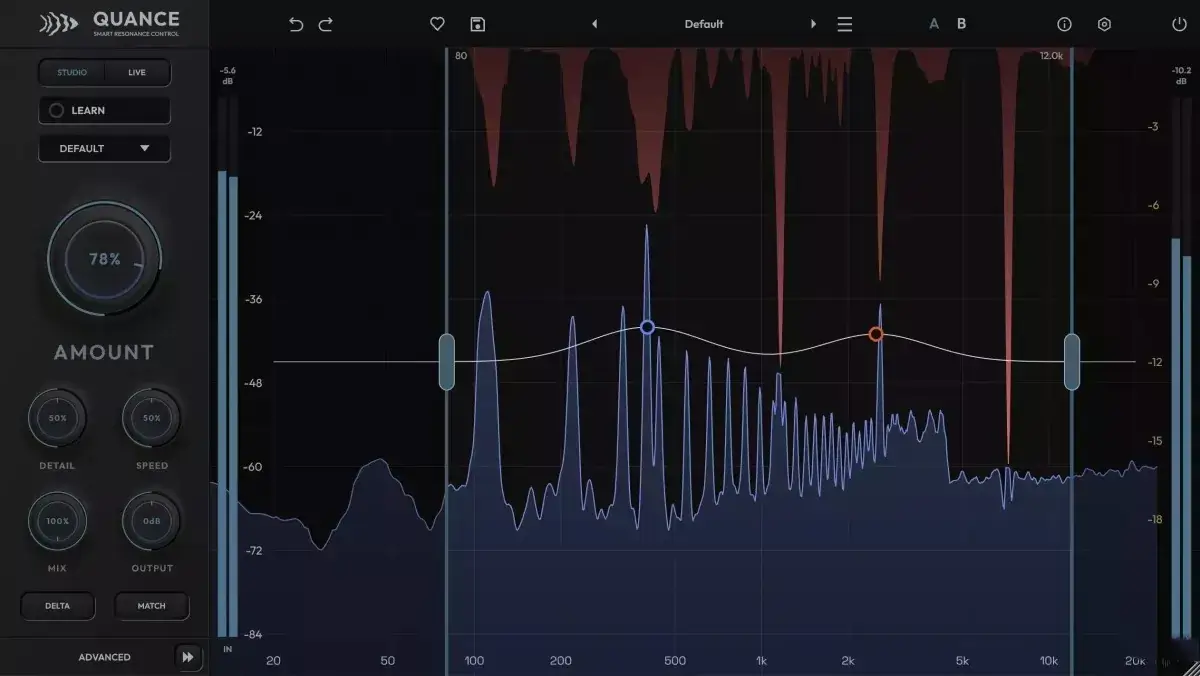
Quance analyzes your sound, finds peaks that are fatiguing to listen to, and reduces them while you play. The harmonics, transients, and timbre that shape your sound remain unchanged.
This problem is familiar to every engineer
When you remove harshness, you often lose something important in the mix. Vowels lose clarity, snare drums lose definition, and while the mix becomes smoother, it can seem less powerful.
Quance was created to solve this problem. Hundreds of self-tuning spectral filters operate only where the spectrum is causing problems, and only as many as necessary. Protection systems work in conjunction with the detector to avoid clipping that could harm the sound.
You choose the cleaning level yourself using a simple control. Quance automatically determines where to apply cleaning and updates the settings every few milliseconds.
Created by professionals
Quance started with a question: what if engineers helped design a resonance control system? We studied existing tools and decided to make them better. Then we did what every developer should do: we shared our prototypes with leading audio engineers and producers and asked how we could improve them.
The feedback we received was helpful. Could this be added? Could this be simplified? Every conversation focused on workflow and performance, and every round of feedback contributed to the plugin’s development. Quance is the result.
When we started receiving letters like this from highly qualified professionals, we realized that we had achieved our goal.
Intelligent learning: starting with the sound itself
Play the part that bothers you and press “Learn.” Quance listens, finds the most noticeable, persistent resonances, and focuses on them, matching each width with its peak. It also narrows the detection range around the problematic area.
Some issues don’t always occur. Hissing sounds may appear in certain words, while room resonance may only occur on one note. A cymbal may sound harsh in the chorus but not in the verse. Click once to start an infinite loop, which will listen to the problematic section and notify you when it’s resolved. Click twice to start a fixed eight-second loop.
The Learn function works according to the selected mode, so vocal processing differs from drum processing. The function never changes the Amount setting, and the entire result can be undone in one step. Save the result, refine it, or delete it.
Tone and transient protection: clean without sacrificing performance
Tone Protect monitors the fundamental frequencies, overtones, and formants of the voice, preventing them from being attenuated where it could be harmful. When boosting vocals, vowels retain their timbre. Turn down the cello, and its sound remains unaffected.
Transient Protect recognizes the attack of a percussion instrument, whether a consonant or a pluck, and attenuates them. A wide attack can sound like resonance, but Quance can distinguish between the two. Snare drums retain their snap, and vocals retain their clarity.
Both functions vary depending on the mode. Drums mode focuses more on transient protection, while Vocals mode focuses on tone. If you’re experiencing pitch-related issues, such as ringing or a “howling” room effect, turn off the protection and let Quance handle the problem.
Taming and protection: eight focus points, four detection ranges
Automatic detection does most of the work. The focus points do the rest. Double-click on the graph to add a point. Raise it to increase detection sensitivity at that frequency, or lower it to protect that area from sensitivity degradation. Use up to eight controls simultaneously, each with its own width—from a narrow notch to a wide curve.
Before adjusting the Amount parameter, set the guard point at the fundamental bass frequency. Add a taming point at 6 kHz for sibilant vocals. Tap anywhere on the headphones to highlight that frequency band and adjust the slider to find the resonance by ear.
Detection ranges determine where Quance can operate. Use up to four points simultaneously to simultaneously attenuate low-mid and high frequencies without affecting the presence region. Seven range presets, from Sibilance to Snare Ring, are accessible with a single right-click.
From zero latency to ultra-high resolution: five quality levels
Quance features four different processing engines in two groups, so the plugin adapts to your needs, not you to it.
Studio uses a three-band engine with multiple resolution levels. Long analysis windows in the low frequency range capture narrow room modes and bass, while short windows in the high frequency range preserve the clarity of transients. Studio Pro is the effective default option. Studio Ultra doubles each window to deliver the best frequency resolution Quance has to offer. Ideal for mixing and mastering, where your DAW compensates.
Live is designed for tracking, monitoring, streaming, and live use. Light and Normal modes provide low-latency windowing. Zero mode is unique in that the audio never goes through a fast Fourier transform. Instead, 48 minimum-phase filters are used in a sample-aligned path to reduce latency, resulting in Quance reporting zero latency. It’s perfect for singing, monitoring, or performing live.
Change grades during a lesson, and Quance will seamlessly move to the next topic. No clicks required.
Automatic loudness matching: evaluating tone, not level . Reducing resonances reduces sound level. A quieter sound can sound worse in quick A/B testing, and this bias causes many engineers to doubt their choice.
Turn on Match, and Quance will continuously measure the perceived loudness of the input and output using psychoacoustic measurements, then adjust for the difference. Walkthrough comparisons, A/B snapshots, and preset listening sessions all become objective. All you have to do is judge whether the track sounds better.
Use it in conjunction with Delta, which only reproduces what Quance removes. Delta shows you exactly what’s being removed. Match will help you decide whether it was worth it.
It has a problem: the buttons get stuck, they don’t spring back, and the program crashes.
It’s Not Fully Cracked, Pressed Buttons Don’t Release, Eventually, It Freezes, Taking The Host Down With It.